

Oto-Base
Lookup Tables Editor
A clean web editor for the reference tables behind your Marketo automations: unlimited tables, records edited in the browser, CSV import and export for Excel, per-user access.
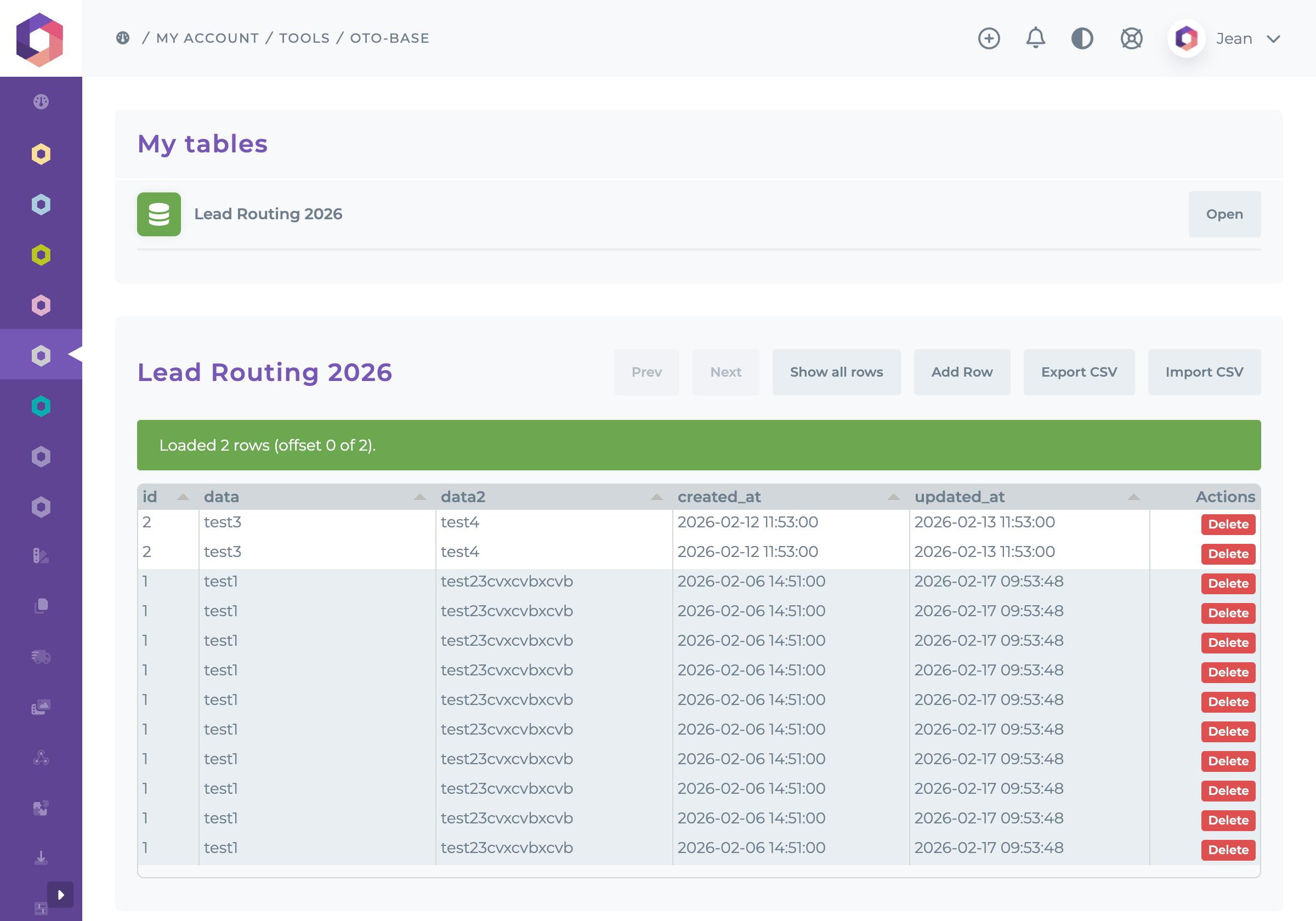
The Lookup Tables Editor gives your marketing team a clean, secure editor for the reference tables behind your Marketo automations: country to region mappings, web page to product mappings, store lists, partner directories, content settings. Change a value in the browser and every webhook, flow step or page that reads the table uses it on its very next call. No developer, no SQL client, no spreadsheet sent back and forth by email.
Why a Lookup Tables Editor
Marketing automation often depends on data that lives outside Marketo: lookup tables that route leads, enrich records or drive content. Kept in a spreadsheet, every change means sending a file to a developer. Kept in a database, only a developer can change it. The Lookup Tables Editor keeps those tables in a hosted MySQL database, where your automations query them live, and hands the editing to the people who own the data.
- Your team updates the data itself: a change takes seconds, not a ticket.
- The data stays in a real database, read in real time by your Marketo webhooks and flow steps.
- Each user sees only the tables assigned to them.
- Nothing to install: the editor opens from your Otowui account.
Features
- Unlimited tables: every table of your space, listed under a readable name. Need a new one? We add it to your space.
- Inline editing: click a cell, type, press Enter. Each value is checked against its column type (whole number, decimal, yes/no, date, date and time, time) before it is saved.
- Add a row through a form that flags the required fields. Identifiers that the database numbers itself are filled in automatically.
- Delete a row, with a confirmation step.
- Search, browse and sort: search the whole table, browse it by pages of 50 rows or up to 10,000 rows at once, sorted by any column.
- CSV export of the whole table, up to 100,000 rows, ready to open in Excel.
- CSV import to add or update rows in bulk, up to 5,000 rows per file: export the table, edit it in Excel, import it back. A report lists every row that was rejected.
- Support via email and ticket system.
How It Works
- Tell us which data you need. During onboarding we create your tables (columns, types, keys) in your dedicated space, and load your existing spreadsheet if you have one.
- The members of your Otowui account get your tables, and we can restrict any of them to the tables you decide.
- Your team opens the editor from their Otowui account, picks a table and edits it.
- Your automations read the tables live: a Marketo webhook, the Database Lookup Flow Step, or your own pages.
Secure by Design
Every user is bound to their own tables: a request for any other table is refused by the server, whatever the browser sends. Columns that hold secrets (passwords, tokens, API keys, hashes) are never displayed nor exported. Every action requires a signed-in session and is rate limited, and exported cells are neutralized against spreadsheet formula injection.
Use Cases
Lead Routing Tables
Keep the mapping from country to business unit, region and sales territory in the Lookup Tables Editor. A Marketo webhook reads it for every new lead and fills the routing fields that the form left empty. When a territory changes hands, marketing operations update one row and the next lead is routed accordingly.
Interest Tracking From Page Visits
Map each page of your website to the products or offerings it presents. On every page view, a webhook stamps the lead with the offerings behind the page, so scoring and nurture follow real interest. A new page goes live? Add a row.
Data for Personalized Content
Store lists, event venues, partner directories, product catalogues: the data your emails and landing pages pull in, read from Marketo through the Database Lookup Flow Step and kept current by the team that owns it.
Data Handed Over by Other Teams
Sales or a partner sends a list? Import the CSV in one step, check the report, and the rows are live. No developer in the loop.
Customer Story
A global software vendor for the capital markets industry runs its lead generation on Adobe Marketo Engage. Its reference tables live in the Lookup Tables Editor: country to business unit, region and territory, and web page to product offerings. Two Otowui webhooks read them on every new lead and every page view to complete routing and track interest, and the marketing operations team maintains the tables itself.
Requirements
An active Lookup Tables Editor subscription. Your tables are set up by our team during onboarding. To use them in Marketo, pair it with the Database Lookup Flow Step, or ask us for a dedicated webhook.
The Lookup Tables Editor turns the tables behind your automations into data your marketing team can own: edited in the browser, read live by Marketo, and visible only to the people you choose. Our team sets up your tables and your users during onboarding, and support is available via email and ticket system. Contact your Otowui account manager or request a demo to get started.
