

Util-CheckIn
Event venue management for Marketo
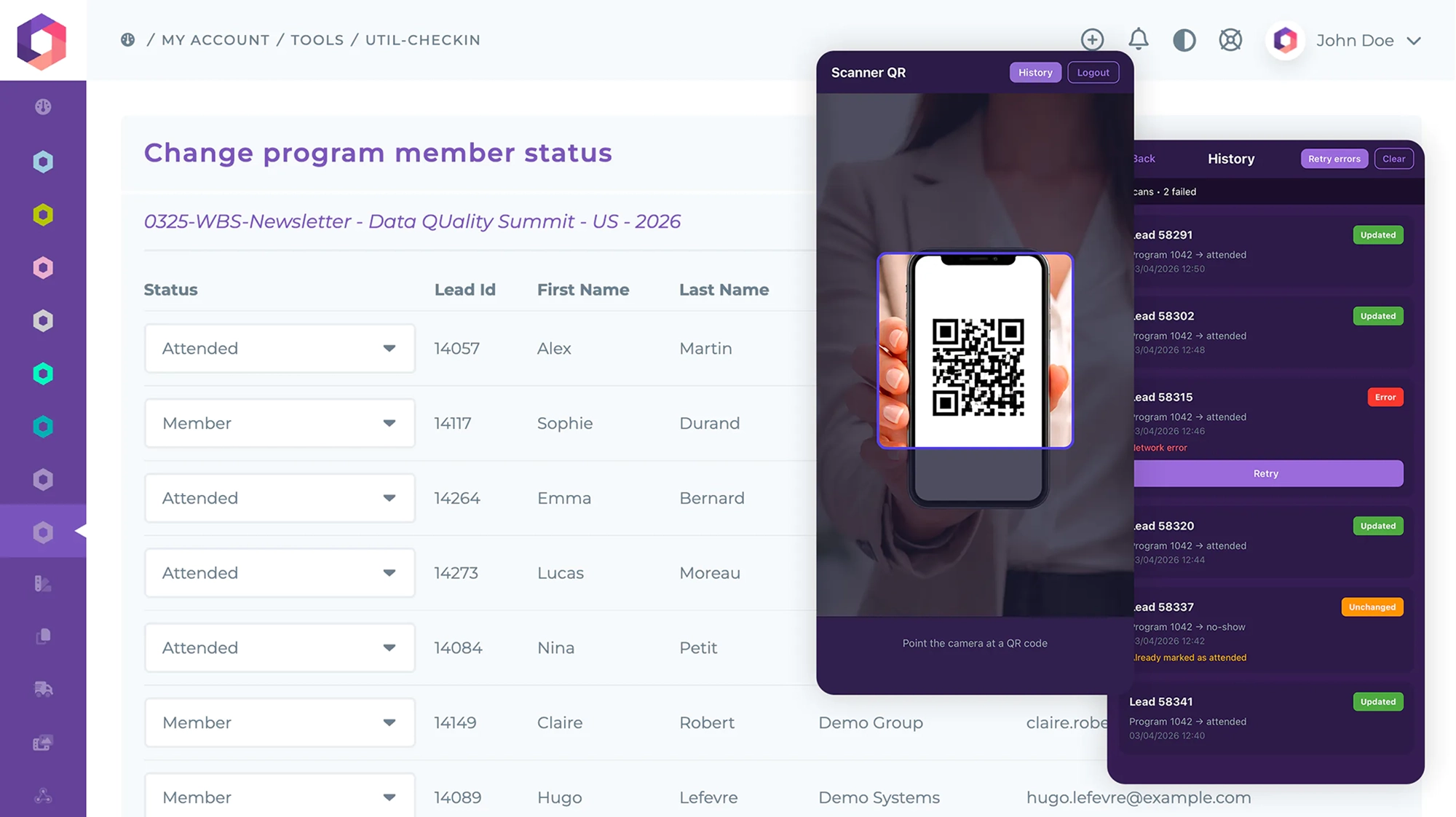
A complete suite of tools for managing physical event check-ins directly from your Marketo campaigns. Whether you are running a trade show booth, hosting a conference, or organizing a corporate event, Util-CheckIn bridges the gap between your digital marketing automation and the real world. Generate custom QR codes, scan attendee badges, and update lead statuses in real time — from your phone or your laptop.
Features
- An iOS & Android app that updates program member status by scanning a QR code.
- A Marketo Flow Step Service to automatically generate personalized QR codes in your email campaigns.
- A dedicated web app to manually update program member statuses from any browser.
- Priority support via email and ticket system.
The Mobile App — Otowui QR Scanner
Otowui QR Scanner is a companion app for event managers using Marketo. Available on iOS and Android, it lets your on-site team scan attendee QR code badges and instantly update lead status in your Marketo programs. No manual data entry, no spreadsheets, no delays.
Every scan is saved locally with its result — updated, unchanged, or error — so your team always has a clear picture of who checked in and when.
Key Capabilities
- Fast QR Scanning — Point your camera at a badge QR code to check in attendees in seconds.
- Real-Time Marketo Sync — Lead status is updated directly in your Marketo program via the Otowui API.
- Scan History — Every scan is saved locally with its status. Review, filter, and export your check-in data.
- Offline Resilience — Scans are stored even when connectivity is poor. Retry failed updates individually or all at once when you are back online.
- Secure Authentication — Connects to your Otowui account with encrypted credential storage on device.
How It Works
- Create an email campaign in Marketo and use the Util-CheckIn Flow Step Service to generate a unique QR code for each recipient.
- Send the invitation email to your event registrants. Each email contains a personalized QR code tied to the lead and program.
- At the event, your team opens the Otowui QR Scanner app and signs in with their Otowui credentials.
- Point the camera at an attendee’s QR code badge. The app instantly parses the code and sends a status update to Marketo.
- View results in real time — success, unchanged, or error — and check the History screen to review or retry any failed scans.
Built for Trade Shows and Live Events
Poor Wi-Fi at events? No problem. The Otowui QR Scanner app saves every scan locally, so you never lose a check-in even when connectivity drops. When your connection returns, retry all failed scans with a single tap. Your Marketo data stays accurate regardless of venue network conditions.
The Flow Step Service — QR Codes in Your Emails
The Util-CheckIn Flow Step Service integrates directly into your Marketo Smart Campaigns. Add it as a flow step and it automatically generates a unique QR code for each lead in the campaign. The QR code encodes the program ID, lead ID, and target status — everything the scanner app needs to process a check-in.
No custom coding required. Configure the flow step once, and every email in your campaign will include a scannable, personalized QR code ready for your event team.
The Web App — Check-In From Any Browser
Not everyone on your team needs a native app. The Util-CheckIn web app provides the same check-in functionality from any modern browser — desktop or mobile. Access your camera to scan QR codes, or manually search and update lead statuses when needed. Perfect for registration desks, back-office teams, or as a backup when a dedicated device is not available.
Use Cases
Trade Shows & Exhibitions
Invite prospects via Marketo email campaigns with embedded QR codes. At your booth, scan badges to instantly mark attendees and trigger follow-up workflows in Marketo. Know exactly who visited and automate your post-event nurture sequences.
Conferences & Seminars
Manage session attendance across multiple tracks. Each session can have its own Marketo program and QR code set. Scan attendees as they enter each room and get accurate participation data for every session — no manual reconciliation needed.
Corporate Events & Private Gatherings
Host VIP dinners, product launches, or partner summits with a seamless check-in experience. Track RSVPs against actual attendance and update your CRM in real time. Your sales team gets immediate visibility into who showed up.
Roadshows & Multi-City Tours
Running events across multiple locations? Util-CheckIn works the same everywhere. Each city gets its own Marketo program, and your local teams scan attendees independently. All data flows back to your centralized Marketo instance automatically.
Requirements
An active Otowui Util-CheckIn subscription is required to access the QR code API, the mobile app, and the web app. Marketo REST API credentials are needed to connect your Marketo instance. Contact your Otowui account manager or visit our pricing page to get started.
